You are using an unsupported browser. Please update your browser to the latest version on or before July 31, 2020.
close
You are viewing the article in preview mode. It is not live at the moment.
> Arxspan > 用户指南 > 实验笔记本 > 把实验笔记本添加到项目中
把实验笔记本添加到项目中
print icon

想要将笔记本链接到项目,您必须具有该项目的写入权限


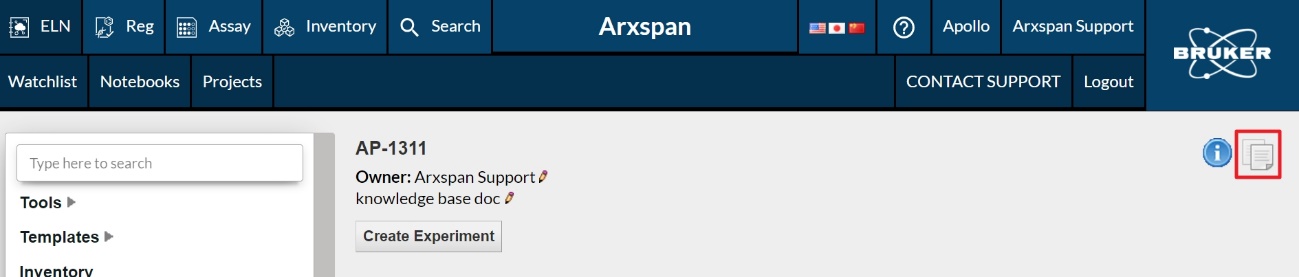
1.将所要添加到项目中的笔记本放入ELN剪贴板中。此剪贴板不同于计算机的剪贴板。请单击页面右上角的“复制”图标将笔记本复制到ELN剪贴板,(如下图所示)。
 

2. 打开需要添加笔记本的项目,并单击与上一步的“复制”图标位于相同位置的“粘贴”图标。
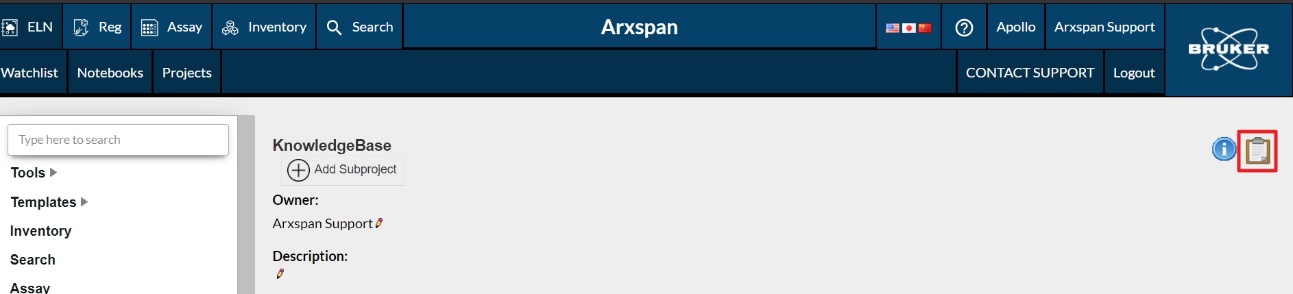
 

您的笔记本将立即在项目中显示。

反饋
0 / 0 覺得這很有幫助

滾動到頂部圖標