


清除谷歌浏览器的缓存/Cookies

Jan 03, 2023
 10
10
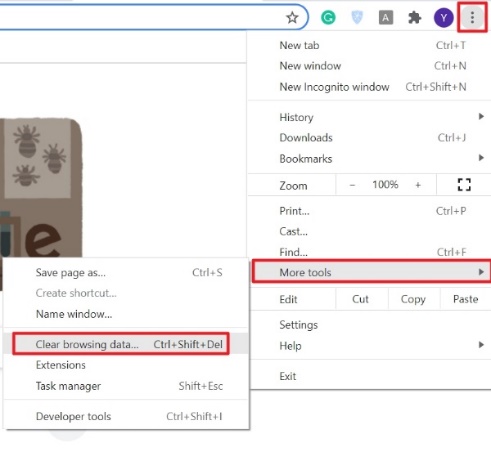
- 在谷歌浏览器窗口的右上方,单击更多(三个垂直点)。
- 单击“更多工具”,然后“清除浏览数据”。
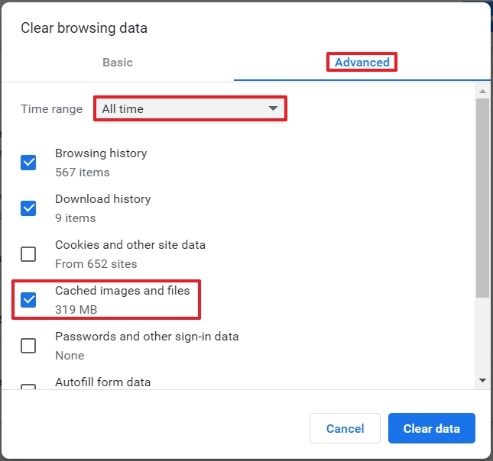
- 选择“高级”选项卡,在“时间范围”选项里选择“所有时间”。
- 确认“缓存的图像和文件”为已选项。
- 如果同时选中“Cookie和其他网站数据”和“缓存的图像和文件”,则谷歌缓存和所有Cookie都将被删除。
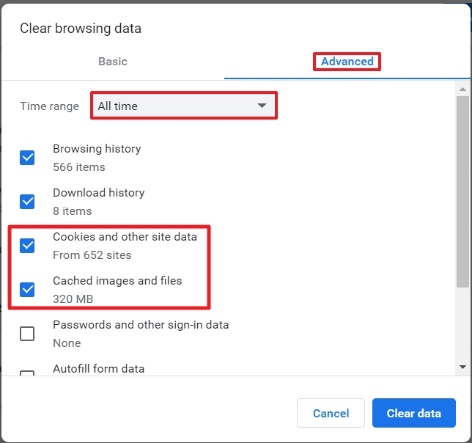
- 单击“清除数据”。

