Change the Ownership of a Notebook

Dec 02, 2025
 130
130
Note: This feature can only be used by a user with the Admin role in the Arxspan System.
This process allows transferring ownership of a notebook to a different user. When users cannot create notebooks themselves, admins need to create a notebook for them. After the notebook is created, admins can transfer ownership to the user.
To transfer notebook ownership:
- Locate the target notebook in the notebook list and click its name to open it.
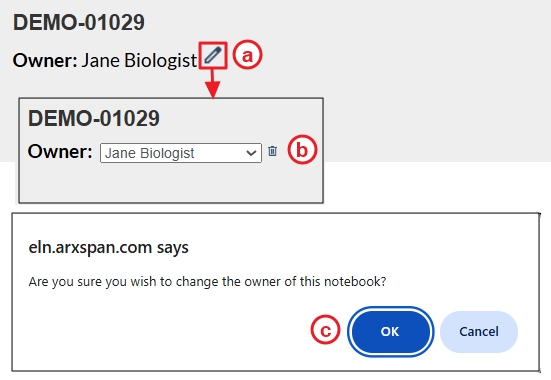
- On the notebook’s Table of Contents page:
- Click the pencil icon next to the notebook owner’s name.
- A drop-down list will appear showing users eligible to own notebooks; select the desired user.
- Click “OK” when prompted.