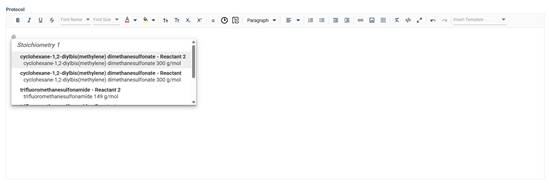
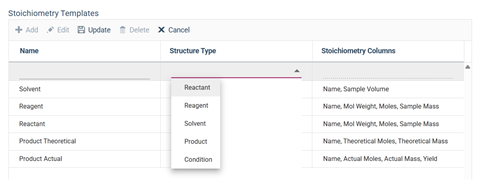
Custom Stoichiometry linked text can be configured inside the stoichiometry field. These linked templates are live connections to entries in the stoichiometry grid. These templates are customizable and there is no limit to the number you can have configured.
- Each stoichiometry grid data type must have linked text templates configured separately. This means if you have more than one grid you must configure the linked text templates for each field.
- To use these templates, you MUST have at least 1 rich text data type in your configuration template. All stoichiometry templates will display in all rich text fields.
- You must add and save the structure type (reactant, solvent, etc.) BEFORE you are able to select stoichiometry columns that you wish to link
Linked stoichiometry text templates are available in all rich text fields within an application template. To access the option, select the @ symbol on your keyboard, this will open a dropdown list of all available templates. The dropdown will sort all available templates first by the stoichiometry grid field they are populated from and then by reactant, reagent, etc. from these stoichiometry grids. Once selected, the system will insert the template as a single entity. If/When you update the stoichiometry grid field, the linked text will update in real time.
NOTE: You cannot remove any part of the template, it is one item even though each individual part will update based on the stoichiometry value corresponding to it.