You are using an unsupported browser. Please update your browser to the latest version on or before July 31, 2020.
close
You are viewing the article in preview mode. It is not live at the moment.
ホーム > Arxspan > ユーザガイド > Chromeでの操作 > ChromeでLive Edit編集拡張機能をオンにする
ChromeでLive Edit編集拡張機能をオンにする
print icon
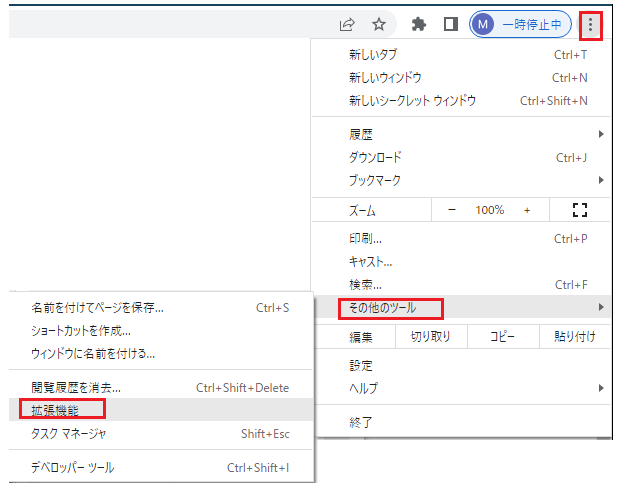
  1. Chrome ウィンドウの右上にある [その他] (縦に 3 つ並んだ点) をクリックします。
  2. 「その他のツール」をクリックしてから、「拡張機能」をクリックします。


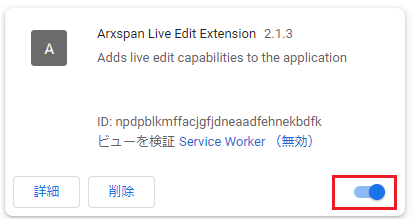
  1. 拡張機能ページで、「Arxspan Live Edit Extension」を見つけてオンに切り替えます。(下記はオンになっている状態です)
フィードバック
0 のうち 0 がこれが役に立ったと感じています

トップアイコンにスクロール